habi.gna.ch

Jump to content

Additional information

Categories

Recent Comments

Meta


Posts filed in ‘gadgets and gizmos’


falling leaves

Nov 2009
01

ich mag ihn, den herbst.

jedenfalls, so wie er sich im moment zeigt: letztes wochende habe ich zwei wunderschöne wandertage im schweizerischen nationalpark verbracht (hier übrigens die fotos) gestern habe ich bei schönstem sonnenschein im thunersee meinen neuen tauchkomputer eingeweiht (der coole auswertungen erlaubt) und heute nach dem frühstück mit freunden auf dem balkon den nachmittag lesenderweise in den kurzen hosen ebenfalls auf dem balkon verbracht.

schade nur verspricht die wetterprognose für die kommenden tage deutlich weniger sonne und wärme. deshalb hier noch das filmli zum gestrigen tauchgang, das wärmt die seele:


Balkon-Timelapse

Jul 2009
18

ich hab ja herr timelapse leu versprochen, dass ich mit bastians fisheye-objektiv noch ein timelapse-film machen werde. heute nachmittag (nein, ich bin nicht auf dem gurten) hab’ ich dann sofortbild.app gestartet und in gut 2 stunden und 45 minuten genau 990 bilder (bis die batterie der kamera leer war) aufgenommen.

dank dem unsteten wetter entstehen daraus dramatische 40 sekunden (die auch direkt auf vimeo in HD angeschaut werden können):


evernote auf dem iphone [update]

Jul 2009
07

heute morgen ist mal wieder ein kleines textli von mir in der berner zeitung erschienen, diesmal nicht im rahmen eines tastentests, sonders als untermalung des artikels über das neue iphone.
herr this hat einige berner iphonebesitzer und blogger gefragt, ob sie über ihre lieblings-applikation schreiben würden. da herr studer schon über air-sharing schrieb, habe ich eine andere meiner vielbenutzten anwendungen geschrieben, über evernote, dass nicht nur auf dem iPhone, sondern auch auf dem kompi zuhause und im büro eine grosse hilfe ist (und mir mal von herrn skooba empfohlen wurde). meine ungefähr 900 zeichen dazu sind heute in der berner zeitung erschienen, scheinen aber momentan nicht auf den seiten der bz zu erscheinen. wer den artikel (so wie ich ihn bei herrn this eingereicht habe) lesen will, kann dies in meinen öffentlichen notizen bei evernote tun. die anderen applikationen, die vorgestellt wurden sind wie gesagt, air sharing von herrn studer, die navigon-navigation von herrn leu und das auch unglaublich praktische shazam von herrn michel.

update: der haupt-artikel ist hier, christians air sharing-text hier, christians mobile navigator-text ist hier, christians shazam-text ist hier, mein evernote-text ist hier


objektiv zu verkaufen [update]

Jun 2009
11

da ich bei ricardo.ch ein unglaubliches schnäppchen gekauft habe (ein ungebrauchtes Sigma AF 3,5-6,3/28-300 DG-Objektiv für 180.-, siehe film unten), kann ich ein anderes Objektiv aus meiner Sammlung verkaufen.


deshalb biete ich ein gebrauchtes Nikon AF Nikkor 35-135mm 1:3.5-4.5 zum verkauf an (bild unten).

das objektiv hat mir bis jetzt gute dienste geleistet, ist gebraucht, funktioniert aber von mir aus gesehen einwandfrei. ich glaub’ ich lass mich so ab 60.- bis 70.- überrreden, das objektiv wegzugeben. das ding passt auf irgendeine nikon-spiegelreflex und könnte sonst gerne auch ausprobiert werden…

562402048_Big.jpg

update: da scheinbar keiner meiner leser und leserinnen interessiert war, gibt’s das objektiv jetzt auf ricardo.ch


iTunes update-check #fail

Apr 2009
28

is this a known problem for other iphone-owning readers of my blog?
iTunes tells me that there are updates for iPhone applications, I click on the “check for updates”-button and iTunes tells me – sometimes twice – that updates for my programs are available. i thus have to click multiple times to see the updates of which I already know that they’re available… quite annoying, don’t you think? does one of my readers have the same problem and even knows a resolution? I’d like to hear your tips.
a short screencast describing the problem can be seen below:


oh, and this post is also a test of jing :)


panoramas from (low quality) movies [update]

Apr 2009
10

whenever i’m spending a day outdoor, i love to take pictures, many of them turn out to be panoramas.

sometimes i leave my camera at home and only have my mobile phone with me. shoothing panoramas with the iphone is possible with panolab [link opens itunes], but very cumbersome. and i try to keep the annoyance of nina as low as possible while stopping on the slopes, so fiddling with my phone for longer than a minute or two is not an option.

recently i was thinking about a quick-and-dirty way of creating panorams with the iphone: wouldn’t it be possible to extract the images of a movie shot while panning the scenery and stitch those together to generate a panorama? today was the perfect way to test this out, on the slopes of the wonderful stockhorn.

the whole process is fairly easy, you only need

all these – very fine – pieces of software are freely available, most of them even free as in beer and as in speech.

step 1:
shoot a movie.

below are the movies i’ve used for this tutorial. both are made with the excellent cycoder.app, only for jailbroken iphones. use any other movie if you don’t have an iphone :) the movies are 384×288 pixels in size, as shown below, just press the play-button.


step 2:
get the movies off your iphone.

cyberduck and SFTP are my weapons of choice, YMMV, but there are tons of tutorials on the web, here’s one for the mac and here’s one for windows.
now you should have some movies on your hard-disk. cycoder has the nice feature to produce quicktime-compatible .mov-files, if you don’t have one of those handy, again, YMMV. (use the excellent handbrake to convert to and fro). quicktime is nice for the next step.

step 3:
import the movies into imageJ.

if you’re on a mac, this is just simple drag-and-drop, on windows you might be quicker altogether if you convert your movies to .avi-files, since installing quicktime for java can be a bit of a hassle, but can be done.

this opens your quicktime movie as a stack of images you can then scroll through. this image-stack can then easily be exported as an image-sequence using “File > Save as > Image Sequence…”. rotate the images if you’ve been dumb enough to hold the iphone wrong :)

then you’ll have a bunch of single images on your harddisk. if you’ve panned quite slowly like i have done, you’re probably gonna have much too many images (167 for the first and 139 for the second movie) to easily stich a panorama. for these movies, i’ve removed some images from the stack using the slice remover plugin. remove slices that are unnecessary like the ones at the beginning and the end, where your glove covers the lens. now having 20 and 32 images from both movies, proceed to the next step.

step 4:
import the images from the step above into hugin, align and stitch.

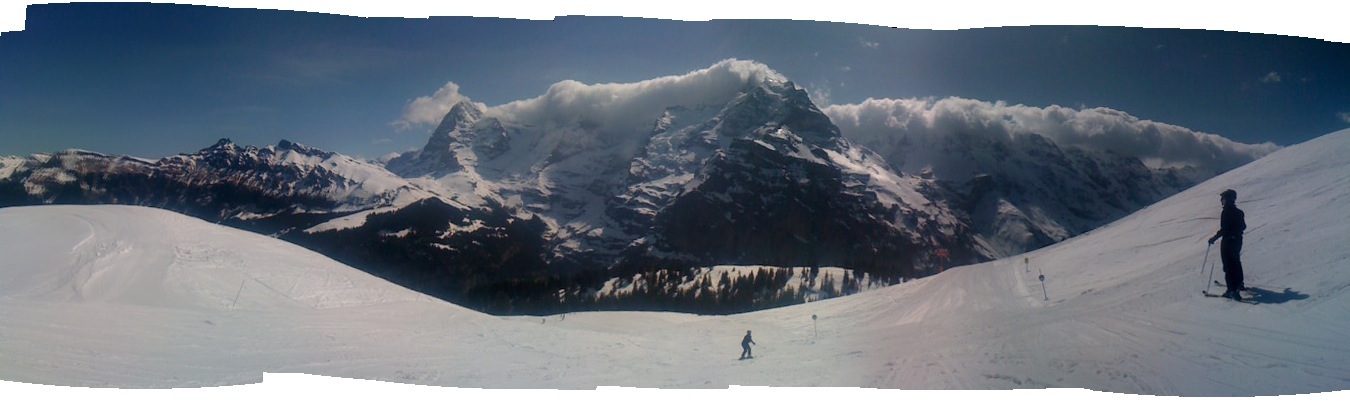
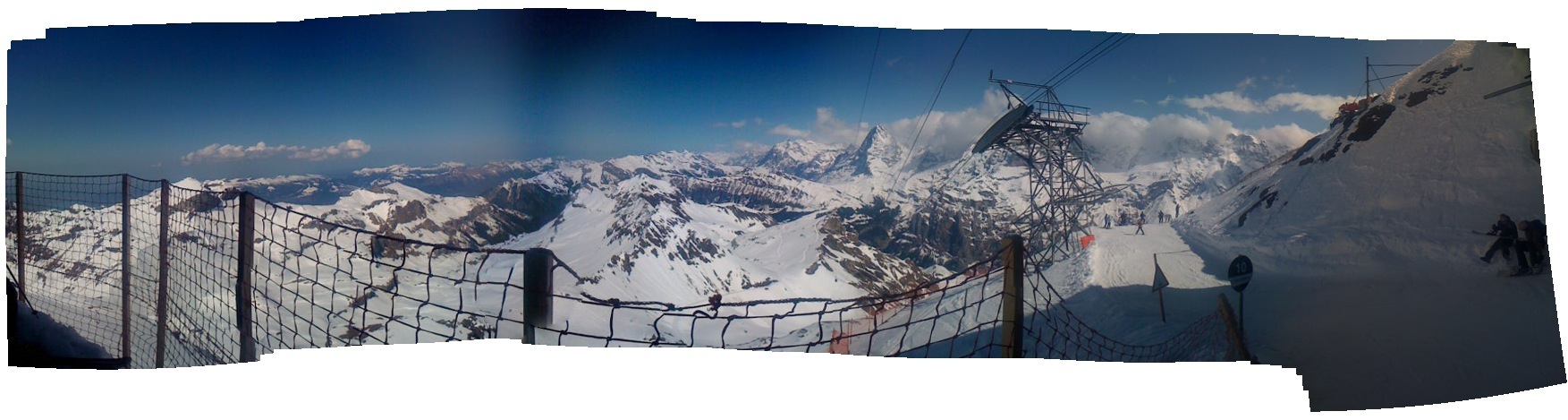
yes, that’s it, it’s really that easy.for the movies shown above i’ve also deleted some bad control points and stitched the panoramas normally and enfused, but this is entirely optional.the end-result looks like the images below. click them to see them bigger.


stockhorn_panorama1_fused.jpg
stockhorn_panorama2.jpg

i know that both panoramas are not perfect. both are quite small, especially the second one has some artifacts and both have varying exposure. but keep in mind that i’ve only bothered nina for 29 seconds, the total time of both movies. not too shabby!

update:

arru from sweden left a comment about extracting the frames of videos using VLC, which is great, because it plays pretty much any movie-format.

since i couldn’t find it, i asked him to outline it for me via email. he agreed that i share his howto, which you can find below:

Extract frames in VLC:

  • Open VLC preferences, select “all” (as opposed to “basic”)
  • Go to Video->Output modules
  • Select ‘Image video output’ (this must be reverted to ‘standard’ when you’re done, to use VLC as a normal video player again)
  • Flip down the subgroup next to Output modules and select Image file’
  • Choose ‘PNG’ as format (JPEG works too, but there will be some unnecessary quality loss)
  • Set ‘recording ratio’ to 10 (determines the number of video frames skipped between images – may need to experiment with this value if images don’t overlap correctly)
  • Press ‘save’ to exit VLC preferences
  • Open and play the video in question as you normally would (notice: there will be no picture – sound however, if applicable, and the VLC controls will move to show you the progress of the conversion)
  • Images are saved to the root of the main HDD on Mac OS X ( / ), on Windows I can only assume it will be C:
  • Don’t forget to reset step 2 to ‘Standard’ when you’re done
  • Throw images into Hugin and run one of the autopano scripts, and so forth

Thanks for that info, Arru!


mit freier software freie software-daten visualisieren [update]

Apr 2009
06

seit einen halben jahr beantworte ich die frage “what’s up?” nicht bei twitter, sondern der quell-offenen alternative, bei identi.ca [1]. über die beweggründe, eine offene alternative zum fail whale zu benutzen soll hier nicht die rede sein [2].

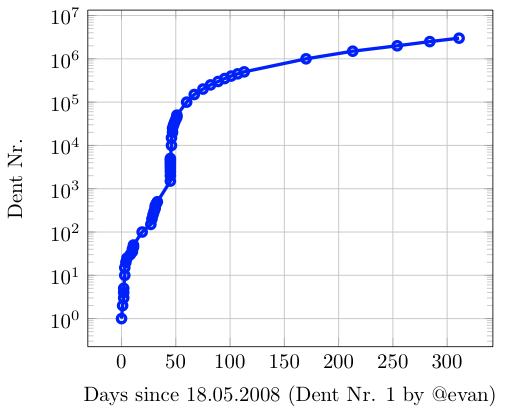
in den letzten tagen hab’ ich mich gefragt, wie schnell identi.ca wächst. jedes status-update wird bei identi.ca als wachsende nummer, in der form http://identi.ca/notice/1 [3]. jede dieser nachrichten wird dann mit einer klar definierten zeit auf der webseite festgehalten. aufgrund der beiden parameter nummer und zeit könnte schon ein kleiner graph entstehen.

da es mir aber äusserst mühsam erschien, genug status updates anzusurfen, die jeweiligen zeiten aufzuschreiben, dies in eine excel-tabelle [4] einzutragen und dann einen plot zu generieren, habe ich mich nach kurzer überlegung entschieden, das ganze anders anzugehen: mit einem kleinen python-skript (siehe hier) lade ich eine definierte nummer von sogenannten dents, mache eine kleine aufhübschung mit ein bisschen text-ersetzung und schreibe das ganze in ein komma-separiertes textfile.

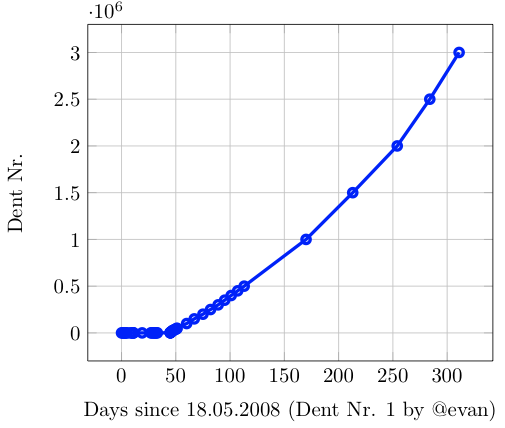
in diesem textfile landen alle parameter, die für einen plot notwendig sind. nach weitere kleinerer rumbastelei landet das ganze in 23 zeilen LaTeX-code (siehe hier), mit dem dann mit der hilfe von tikz und pgfplots untenstehende graphik entsteht [5]. die rumbastelei hat vor allem mit der anpassung von zeitspannen zu tun, damit’s ein schöner plot wird.

dents.png

im ganzen plot sind nur 55 datenpunkte verwurstet, aber nichtsdestotrotz kann mann einen eher exponentiellen anstieg der anzahl nachrichten in den ersten 300 tage identi.ca feststellen. damit der plot aussagekräftiger wird, muss ich mein python-skript mal etwas länger laufen lassen, oder jemand interessiert sich wirklich so fest dafür, dass er es mit meiner vorlage weiterführt oder verbessert.

dieser post soll auch dazu dienen, dass ich – nach dem blgmndybrn special im musigbistrot – grad noch bastian einen richtigen hinweis auf identi.ca und LaTex geben kann: bastian, identi.ca ist oben abgehandelt, meine code-schnipsel zu LaTeX landen hier, diejenigen zur bildverarbeitung mit imagemagick hier. weiter wollte this noch auf das schöne paket hingewiesen werden, mit dem mann – mit 23 zeilen code – solche plots wie oben stehend generieren kann. eben, pgfplots und mein beispiel an LaTeX-code.
also, wenn ich für die ausrechnung der tage seit dem start nicht doch gestern abend numbers verwendet hätte, würde auch der titel dieses eintrages stimmen, mit python habe ich die frei verfügbaren daten von identi.ca geladen, in ein text-file geschrieben und mit dem übermächtigen LaTeX daraus ein kleines, aber feines pdf erstellt.
und ja, ich geb’s zu, ich bin ein nerd!

[1]: seit längerer zeit wird auch mein status beim moloch facebook von identi.ca aus aktualisiert

[2]: “my data”, “my content”, portabilität, freie meinungsäusserung, etc.

[3]: hier das erste status-update von evan, dem kopf hinter dem ganzen

[4]: oder numbers

[5]: natürlich als pdf, hier der einfachheit halber als .png-bild

ps: fast noch schöner sieht’s mit logarithmischer y-achse aus; dieser plot wurde mit der leicht modifizierten version des latex-codes (hier zu finden) erstellt.

logdents.png

update: tobias diekershoff hat heute ein viel schöneres skript und eine viel fundiertere aussage über die anzahl dents veröffentlicht. falls es jemand interessiert: hier weiterlesen!


unveiling the “sixth sense”

Mar 2009
29

now that’s a TED-talk that keeps you dreaming on a sunday afternoon. great stuff!


that’s how my heart beats

Nov 2008
04

whoever follows me on identi.ca (or on facebook for that matter) knows that i’ve spent a noon lying in a tight and noisy tube. at the inselspital they’re always looking for gunia pigs for mri-studies, and i’ve been there (for the second time now). the reward you get afterwards is a dvd with the images of your bodypart they imaged, the last time it was my head, now – since they’re working on spectroscopy of the heart muscle – i got images of my beating heart and my torso.

and since there is a wonderful free dicom-viewer for the apple platform, osirix, i’ve tried to make some nice videos of my inner workings. so without much further ado, here’s the videos:

my beating heart, axial view:


my beating heart, sagittal view:


a little fly-around of my torso:


all the images have been made with double triggering, once a trigger for breathing, to compensate for the motion of the internal organs, and on top of that with a trigger on the heart-beats, to actally be able to image a full beating sequence of my heart. the funny thing is, that the people that performed the study had to ask me to breathe a bit faster, since one imaging cycle took them so long :)

oh, and BTW: here’s one video and one view of my head. whoever tells my the reason that a piece on the back of my skull is missing wins a price.


gut gerahmt [update]

Oct 2008
17

this hat mich mal wieder gefragt, ob ich bereit wäre, für die BZ in die tasten zu greifen. in untenstehendem text versuche ich die freude an meinem neuesten gadget in allgemeinverständliche form zu fassen. der text sollte heute in der BZ erscheinen, falls es denn möglich sein sollte auf der etwas unpraktischen neuen seite danach zu suchen (hier geht nämlich nix und espace.ch/tastentest ist auch tot. auf tastentest.bernerzeitung.ch ist auch noch nix zu finden…)

update: bei this drüben gibt’s die seite im original-layout, auch wenn’s eher um seinen artikel über die e-book-reader geht.

«Schon wieder?», fragt meine Freundin, als ich das Päckli auspacke. Ich gestehe, bei neuartigen Gadgets funktioniert meine Impulskontrolle nur mangelhaft. Als ich den Estarling-Bilderrahmen bei einem Internetladen sah, habe ich mich spontan zum Kauf entschlossen. Das Spezielle an diesem eleganten schwarzen Ding: Es ist kein gewöhnlicher Bilderrahmen, sondern ein als solcher getarnter Bildschirm. Sobald ich die Speicherkarte meiner Kamera darin eingelegt habe, ändert sich der skeptische Blick meiner Freundin. Der Rahmen zeigt die Bilder unserer letztwöchigen Wanderung als Diashow an.

Schon das allein ist nicht schlecht. Was für mich aber der Grund war, genau diesen Rahmen zu kaufen, ist sein eingebauter kabelloser Anschluss an das weltweite Datennetz. Dies ermöglicht mir, über eine vom Hersteller eigens dafür gemachte Webseite Bilder auf dem Rahmen zu verwalten und direkt vom Computer neue Bilder in die Diashow einzufügen. Mit ein wenig Aufwand kann auch eine neumodische Variante des metaphysischen Gruselns aus Mani Matters Coiffeur-Lied nachgestellt werden, wenn Fotos des Rahmens wieder auf den Rahmen geschickt werden. Alle diese Kunstwerke werden dann auf einer Bildschirm-Diagonale von 20 Zentimetern in brillanten Farben dargestellt. Da jeder Rahmen mit Vorgaben zur Ein- und Ausschaltzeit versehen werden kann, hält sich auch der Energieverbrauch in Grenzen.

Zudem besitzt jeder Bilderrahmeneine individuelle E-Mail Adresse. So können mir Freunde und Wildfremde Bilder schicken. Aus dem Haufen unbekannter Bilder – die Absenderadresse wird nicht angezeigt – erkenne ich nur eines eindeutig. Der fotografische Geburtstagsgruss, auf dem ein Freund ein paar Kerzen für mich ausbläst, freut mich speziell, denn mein neues Gadget war nämlich ein Geburtstagsgeschenk von mir an mich selbst.


Paging

Tags

abfall apple avanex bern bike blgmndybrn blogospherahelvetica comic copyright creativecommons dance diving flash fun gemmi gps gurtenfestival hugin imap gmail mail iphone kandersteg krankenkasse lang:de loutop music nikon d80 panorama ph pixmix screenshot skiing stuff suicmc08 theat thunersee time-lapse velocontent video wahlen wedding word work xing youtube überwachungsstaat

Archives

Credits

Template designed by praegnanz.de.